Workout · Nutrition · Recovery — free on iPhone
The workout tracker built around showing up
Log every set, meal and streak on a calendar of what you actually did. An AI trainer that plans your month, readiness from your own baselines, and friends who keep you honest.
 Free to start · 3-day trial on paid tiers
Silent screen recording of the StayFit iOS app in dark mode. Home shows the daily quests card with one of three quests done, a logged workout ready to claim and steps and meals partway. The Workout tab opens, Start empty workout brings up the exercise picker, the Chest filter is tapped and Barbell Bench Press is added. The timer starts, set one's weight field enters editing mode with its own keypad bar, 175 pounds and 6 reps are typed, Done is tapped and the set is ticked complete. The rest timer starts and the 2-minute preset is chosen. Finish Workout shows the Workout Complete summary, and the recording returns to the daily quests on Home.
Five tabs. Nothing you won't use.
The whole app still fits in five tabs — here is what each one does.


Home
Your day on one screen — readiness up top, your week and streak, and today's three quests with a finished workout ready to claim. Further down: calories against your targets, the session your coach assigned, and a banner back into a workout in progress.
Workout
Log set by set from a 2,286-exercise library. Today's planned workout opens from your last saved plan, refreshes in the background, and starts with the weights from your last session. Finish, then share it your way — your own photo with a filter and the light you choose, and a StayFit stats sticker you move with a finger and pinch to resize.
Calendar
Workouts, meals, photos and notes land on the week or the month. Planned sessions — from you, your 4-week AI block or your coach — sit beside what you actually did, and two days swap with a tap.
Inbox
Main, Messages and Requests, with an exact unread badge. Swipe to mark read, clear or archive — with Undo.
Profile
Your public profile, progress photos, achievements, strength analytics and friends — your whole history in one place.
Logging that stays out of your way
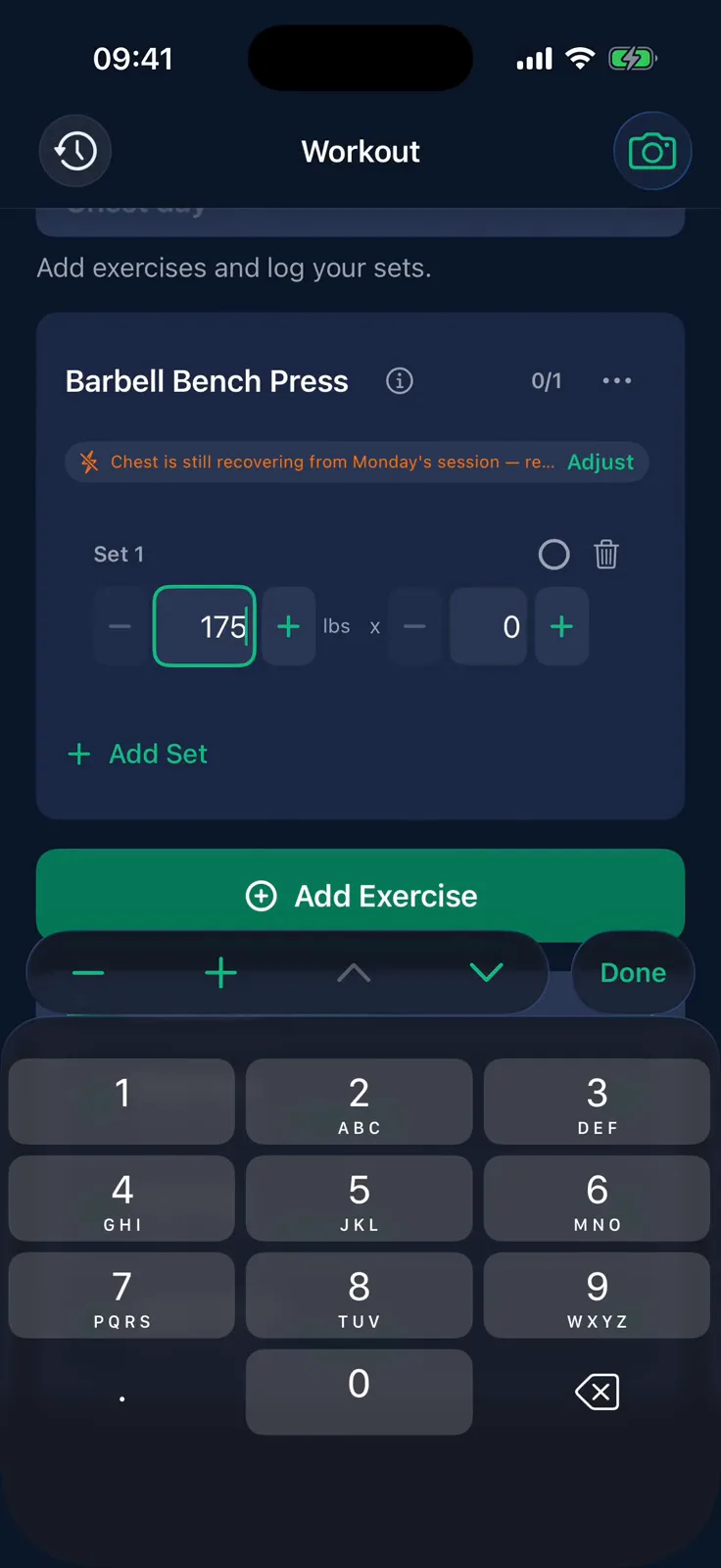
While you type a weight or reps, the screen belongs to your workout — the tab bar steps aside, there's one Done button, and the set you're editing stays in view.
- + and − never fire on a scroll, taps count once, and press-and-hold repeats smoothly
- Next and Previous move you from weight to reps to the next set — the number you tap is selected, so typing replaces it
- A rest timer that stays accurate when you leave the app, with presets from 30 seconds to 3 minutes and your length remembered
- Deleting a set asks first and gives you 5 seconds to undo; finishing with no signal saves and syncs later
Silent screen recording of the StayFit iOS app in dark mode, in a bench press workout with two empty sets. Set one's weight is focused in editing mode: 185 is typed, Next moves to reps (5), then on to set two's weight (195) and reps (5), and Done closes the keypad. Holding the plus button on set two's weight repeats it up to 250. Set one is ticked complete, the rest timer starts, and the 1-minute and 1 minute 30 presets are tapped. Set two is deleted, a toast offers Undo, and Undo brings it back.
Train with a real coach
A human builds your program — every assigned session lands on your Home screen and calendar, and their messages arrive in your Inbox.
- Coach-built programs with sessions scheduled onto your calendar automatically
- Message your coach on any tier — coach conversations are never paywalled
- Your coach sees your health data only if you consent — every sharing toggle starts off
Silent screen recording of the StayFit iOS app in dark mode, signed in as a client with a coach. Home opens on the recovery score and scrolls past the daily quests to the Your Program card: the 12-Week Strength Block from Coach Reviewer with the coach's notes. The Calendar shows October with today's agenda, and the Inbox opens the Coach Reviewer conversation about this week's training block, ending on the coach's latest message.
AI that's actually honest
An assistant that answers from your own workouts, food and recovery — and changes your calendar only when you tap Apply, or when you turn on Auto-apply for that chat. Every limit is printed on the pricing page.
- Turn on the 4-week block and the builder plans a month — baseline, build, peak, deload — straight onto your calendar
- Cardio comes out as cardio: a 20-minute incline walk is one 20-minute effort with your targets filled in, and intervals show each round
- Ask for a workout and the reply streams in as a plan card — exercises, your loads, and Start, Edit or Save. The card is still in the chat when you come back, and the assistant remembers it, so you can ask about it later
- On paid tiers the trainer edits, swaps or removes workouts and meals when you tap Apply. Turn on Auto-apply in a chat and the workouts it builds go straight onto your calendar, with Undo. It says a workout is scheduled only when it is
- Settings lists everything the assistant remembers, so you can delete any of it
- Free includes 3 AI-built workouts a week, 1 AI meal plan a week and 3 food analyses a month — and no AI chat. We say so instead of pretending.
Silent screen recording of the StayFit iOS app in light mode. The AI Workout Builder opens with today's recovery status and workout types. Scrolling down, Make it a 4-week block is switched on and its summary appears: week 1 baseline, weeks 2 and 3 a little more each, week 4 a deload. Generate Workout Plan shows Building your plan, then the Strength Builder Program as a 4-week block: 4 days a week, 60 minutes, advanced, a week and day selector, Week 1 of 4 Baseline with the Upper Body Strength session, and Schedule All and Start buttons.
Eat to your targets. Watch the work show.
A real food database and a nutrition dashboard, next to the Progress Photos screen — food search, barcode scanning and progress photo compare are free on every tier.
Nutrition
A million foods, the serving you'd actually eat
Food logging rebuilt from the ground up: a real database, real portions, and a dashboard that tells you what to eat next.
- Over a million foods from USDA and Open Food Facts, with results as you type — "apple" is 1 medium, 95 calories, one tap to log; when a name means several things, StayFit asks which one
- Browse 25 categories with an icon for every food, or scan a barcode (lookups answer from your phone first), and scan the nutrition label when a product isn't found
- Describe a meal in words or by voice, or snap a photo — every estimate lands on a review screen before it's saved (3 AI analyses a month on Free, up to 100 on Max)
- Quick-add calories, copy yesterday's lunch, save meals you eat often and build recipes with per-serving numbers
- A nutrition dashboard: calories, protein, carbs and fat with what's left today, a week view with your streak, and suggestions like "40 g protein left — 3 oz chicken breast gets you there"
- Targets from your goal and activity, a preset or your own numbers — optionally saved to Apple Health — plus the Meal Planner and AI meal plans (1 a week on Free)

Progress Photos
See the change, side by side
Every progress photo in one place — filtered by pose, viewed full screen, and on the calendar day you took it.
- Compare any two photos and share a branded before/after card — free on every tier
- Play your photos as a timelapse on Plus and above
- Unlimited progress photos from Plus up
- Private by default — progress photos are never shared with a coach

Recovery you can see
Not a black-box score — a readiness number computed from your own data, and a body map of what needs rest. Max plans adjust themselves to it.


Readiness from your own baselines — free
A daily score built from 28-day personal baselines — HRV, sleep, resting heart rate and bedtime consistency — on every tier. It needs about two weeks of signal before it scores you, and says so. No wearable? A once-a-day “How do you feel?” check-in keeps it moving.
Apple Health, both ways
StayFit reads 17 metric types from Apple Health — heart rate, sleep, steps, effort and more, including what your Apple Watch records. It writes back the workouts you finish (with workout verification on) or confirm, the effort you rate, and your food only if you turn that on. A workout Health saw but you didn't log shows up as Activity Detected: Confirm is instant, with Undo.
A muscle map of what you trained
On Plus and above, per-muscle recovery windows computed from your actual workouts, with advice on what to train next. Oura Ring connects natively on Pro; WHOOP and Garmin are marked “Coming soon”.
Show up, earn coins, compete on what you actually did
Coins are earned by training and spent inside StayFit. They're never cash, they can't be withdrawn, and nothing you buy with them is random.


Daily quests
Three small goals on Home, every day, checked on the server.
- Log a workout+5 coins
- Hit your step goal+5 coins
- Log two meals+5 coins
- All three done+5 bonus coins
Earn, then spend
Coins come from training — streak days, weekly goals, PRs, milestones, invites. Spend them in the Shop.
- 24-hour Pro pass400 coins
- Streak freeze / streak repair30 / 60 coins
- Profile frames and avatar rings150–350 coins
- Gift coins to a friend25+ coins
Compete, fairly
Every result counts verified workouts only.
- 1v1 coin challenges — one free no-stake challenge every week
- Group pots for 3 to 10 people
- Weekly leagues, Bronze to Diamond, against active people at your level
- Monthly gym, city and friends leaderboards
- Squads of 4–6 with a shared goal — a missed week returns every stake
- Duo streaks and a 30-day season pass with a free and a Pro track
Invite a friend and you each get 150 coins when they finish their first workout. Coin packs are also sold in the app, from 100 coins for $0.99 — every coin price is on the pricing page.
Friends who keep you honest
A social layer built from what you actually logged — stories, profiles and messages around real training.
- Stories from a full-screen camera — front flash, double-tap to flip — or one-tap templates drawn from your workouts, streaks and PRs
- A feed, For You, and public profiles with your posts, progression, calendar and achievements — or keep your account private
- Group chats and close friends for everyone; direct messages from Pro
- Share cards for workouts, streaks and badges through the iPhone share sheet — a workout card can also be saved to Photos or copied as a sticker
Silent screen recording of the StayFit iOS app in dark mode. From Home, Alex's story opens: a workout card from today's upper-body session, then a 27-day streak card. The Inbox Messages filter opens the thread with Jordan Lee, who has agreed to a two-week challenge and congratulates Alex on a 200-pound bench. Profile opens on Alex's profile, then Compete lists the league, group pots, leaderboard, squad, duo streaks, season pass and quests, and the season pass shows day 15 of 30.
Coach your clients inside the app they already train in.
- A client roster with compliance tracking and consent-gated health views
- Programs from 1 to 52 weeks — assigned sessions land on your clients' Home screens and calendars automatically
- Coach up to 3 clients on Pro, 5 on Max, or more on a Coach plan

Start free. Upgrade when it earns it.
3-day free trial on Plus, Pro and Max for first-time subscribers — cancel anytime.
Free
$0/mo
No card, no trial needed
- Full workout logger, 2,286-exercise library, calendar and streaks
- Daily readiness score and Apple Health sync
- 3 AI workouts a week, 1 AI meal plan a week, 3 food analyses a month
Most popular
Plus
$11.99/mo
or $81.99/yr · 3-day free trial
- AI chat (20 a month) and 10 AI workouts a week
- Per-muscle recovery map and 30 days of recovery history
- Progress timelapse and unlimited progress photos
Pro
$20.99/mo
or $147.99/yr · 3-day free trial
- AI chat (100 a month) and 30 AI workouts a week
- Direct messages and Oura Ring
- Coach up to 3 clients yourself
Max
$48.99/mo
or $409.99/yr · 3-day free trial
- Everything in Pro
- Unlimited AI workouts, 300 AI chats and 100 food analyses a month
- 14 AI meal plans a week, unlimited recovery history
AI limits reset on their own clock: chat and food analyses monthly, AI workouts and meal plans weekly, voice logging daily. Billed through the App Store, or Stripe on the web.
Asked before installing
Show up. The calendar keeps the score.
Free to start · 3-day trial on paid tiers · no ads, ever